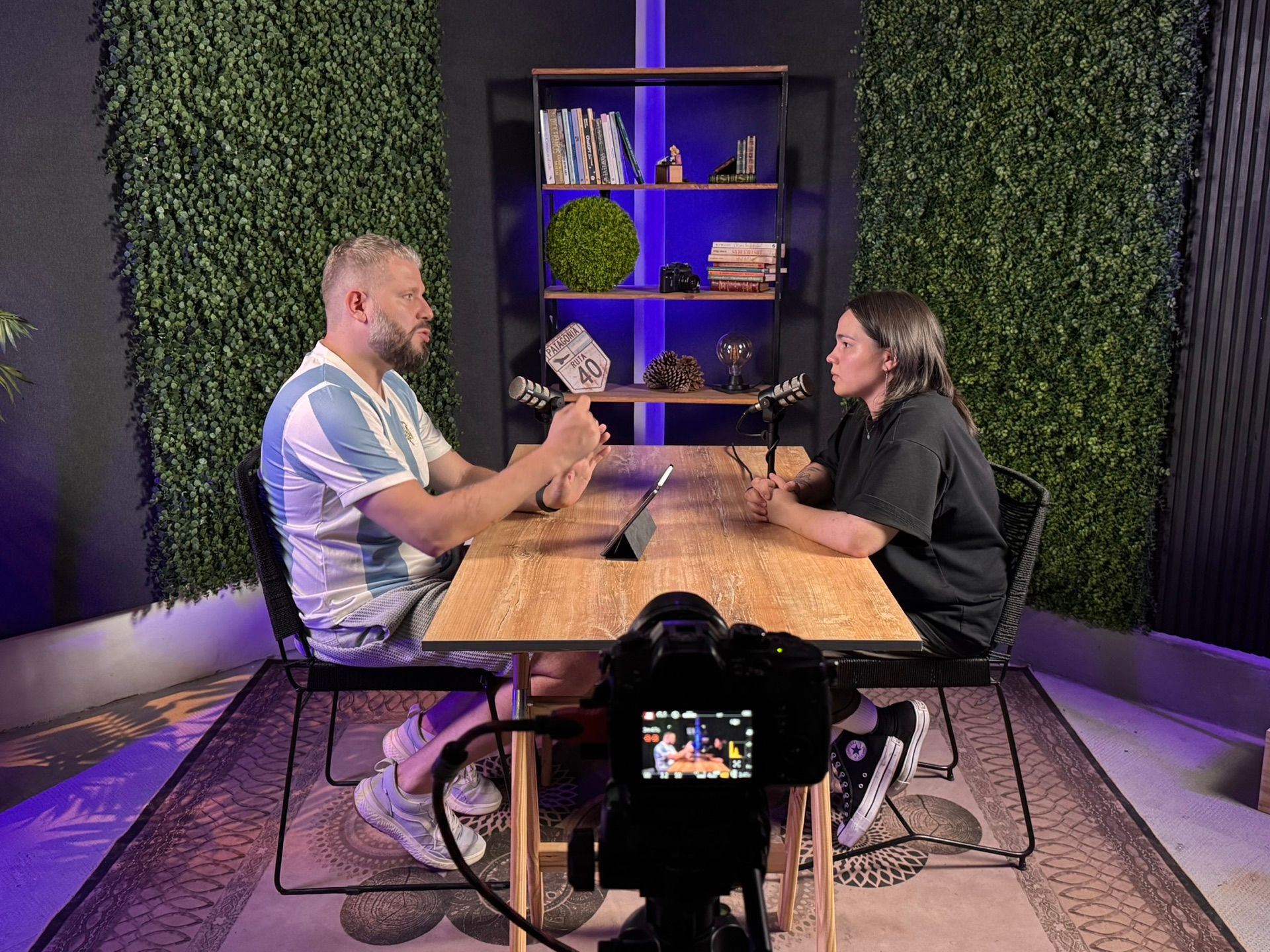
A live football show rests on three things: a format that repeats every week, a conversation between several hosts that sounds and looks good, and handling the chat while the stream is running. The equipment is chosen to serve those three. Below is the order of preparation and a public example: the Arsenal En América podcast, which streams live on YouTube from our studio in Buenos Aires.
Step by step
- Define the format: what the episode covers, which day it goes out and how long it runs.
- Put together a fixed crew: who hosts, who comes as a guest, who prepares the data.
- Write a rundown by segments and estimate the time for each one.
- Decide where you stream from: from home on your own or from a studio.
- Prepare the channel: check that live streaming is enabled, schedule the stream and pick a chat moderator.
- Prepare graphics in advance: the show logo, host names, stats for each segment.
- On the day, connect the encoder to YouTube, check every microphone and the picture in the preview, and only then go live.
- After the show, add chapters to the description and mark the moments for short clips.
Which format to choose for a football show
The format depends on the day the show goes out and on what has happened on the pitch by then. Óscar Egido, a sports radio presenter, recommends building the content around the day of the week: a Monday show reviews the weekend, a Thursday show previews the next round. He also insists on a fixed structure and a fixed time slot, so the audience knows when the show is on and what to expect.
Several formats work for a football show:
- matchday or match review: after the game, with ratings, key moments and stats
- preview: before the match, with the line-up, the opponent and the hosts’ predictions
- club show: everything about one team for its fans, games, transfers, the academy
- interview: a guest at the table or on a call from another city
- transfer special: during the transfer window, when there is more news than football
Pick a length you can keep up every week. Arsenal En América goes out on Mondays and an episode runs about an hour.
How to build the show rundown
A rundown is the list of segments in order: the topic, the approximate time and which host opens it. It lets the hosts argue freely without losing the thread. It tells whoever runs the technical side when to bring up a graphic and which shot to take.
You can see what a rundown looks like in practice in an Arsenal En América episode. The hour of talk is made up of segments: an intro, the starting eleven and who was missing, overall takeaways from the match, three segments on individual players, transfer rumours and a closing question about the season. The last segment is aimed at the audience: the hosts ask the question on air and invite viewers to answer in the comments. That way the conversation carries on after the stream ends.
Prepare the material for each segment in advance: numbers, line-ups, quotes from the coach. In the same episode the hosts put match stats graphics on screen, and part of the data came from a team member who was not in the studio that day. Preparation can be done by someone who never appears on camera.
How to go live on YouTube
To stream live, the channel has to be verified, the person running it has to be at least 16, and the channel must not have had live streaming restrictions in the last 90 days. Check this ahead of time, not on the day of the first show.
YouTube gives you two ways to go live: with a webcam straight from the browser, or with an encoder. An encoder is software or hardware that combines the camera feeds, the sound and the graphics into one signal and sends it to YouTube. A show with several hosts needs the second option: a webcam gives you a single shot and cannot switch between cameras.
This is how you start a stream with an encoder:
- In YouTube Studio, use the create button to open the live control room.
- Schedule the stream: title, description, thumbnail, date and time. A scheduled stream gets its own page right away, and you can share the link with viewers beforehand.
- Choose the visibility: public, unlisted or private. A private or unlisted stream works well for a test run before the first episode.
- Copy the server URL and the stream key and paste them into the encoder. The stream key is the password to your stream: keep it off camera and never send it to anyone.
- Start streaming from the encoder. When the preview shows up in the control room, check the picture and the sound.
- Click the button to go live. To finish, stop sending from the encoder.
Before going live, pick the latency. The stream settings offer three options: normal gives the best quality and supports 4K, low keeps the delay under 10 seconds for most viewers, and ultra-low under 5 seconds, but viewers see more buffering. For a show that answers the chat the difference is noticeable: with normal latency, a question from the chat reaches the hosts after the conversation has moved on.
YouTube publishes the encoder settings itself. For 1080p at 30 frames per second with the H.264 codec, the recommended video bitrate is 14 Mbps (minimum 5), and at 60 frames, 17 Mbps (minimum 6). Audio is AAC at 128 Kbps and 44.1 kHz, with a keyframe every 2 seconds. Your upload speed has to exceed that bitrate with room to spare, and the computer is better connected by cable.
What changes when a podcast goes live
In a recording you can cut a slip and rearrange the segments. Live, the audience sees everything as it happens, and the recording stays exactly as the stream went. In return you get the chat: viewers argue, ask questions and become part of the show.
Arsenal En América ran as a podcast for years, and in the first live show from the studio the hosts recall recording from home, with their own desk, their own microphone and a makeshift set. Live, they greet viewers by name, answer chat questions in the middle of a segment and thank people who send a Super Chat.
To keep the chat from turning into noise, one person has to look after it. YouTube has moderation tools for this: moderators with different permission levels, slow mode, a blocked words list, holding questionable messages for review and subscribers-only chat. The hosts read and answer questions, and the moderator removes spam and keeps the tone in check. Assign the moderator before the first live show.
Sound: one microphone per host
When people talk around one table, everyone speaks into their own microphone and sits close to it. Shure explains that a cardioid microphone picks up little sound from the sides and the back, and that keeping it 5 to 30 cm (2 to 12 inches) from the mouth lifts the voice above the room noise. For a show, this means the person next to you is quieter in your microphone, and the voices don’t blur into one murmur. A single microphone for the whole table can’t do that.
Live, levels have to be set before you start, because you can’t fix them afterwards. Check each microphone by asking the host to speak at the volume they argue at, not the one they say hello at. We wrote more about microphone types and headphones in our article on what you need to record a podcast.
At the studio each host has their own microphone, the signal is mixed on a sound desk, and an operator runs the audio during the stream.
Cameras, switching shots and graphics
A show with several hosts needs a wide shot of the table and a separate shot of each host. You switch between them live, while the stream is running, on a video mixer (also called a switcher). A single fixed camera for an hour of talk shows the table, but not who is speaking or how the others react.
Nobody can argue and keep an eye on the cameras at the same time, so the technical side is handled by the crew. Camera operators stand behind the cameras and hold the frame: composition, focus, the host who leans forward or sits back in the chair. The live director switches shots and puts graphics on screen: the show logo, host names, score and stats overlays for each segment. Graphics are prepared before the show and brought on air as the conversation goes.
In the Arsenal En América streams the hosts sit at the table with microphones and laptops, against a dark backdrop with green panels, a red vertical accent and the show logo. We set up the backdrop, panels and lighting, and the team brings the logo and the show’s props. For people who stream with us regularly, we keep those things at the studio, so the set doesn’t have to travel every week. The hosts prepare the stats themselves, and our live director turns them into graphics and puts them on air.
At our streaming studio in Buenos Aires a show like this is shot on at least three cameras: a wide shot of the table and close-ups of the hosts. Two camera operators work the cameras, and the live director switches shots and runs the graphics. The live director is a separate role: ours have worked in television and on complex live broadcasts, including football matches. We can also bring an online guest into the stream, for example a former player or a journalist from another country.
Before the show we take care of all the technical preparation: we set up the scene and the lighting, configure the stream to your channel and check that the signal reaches the platform. The hosts only need to arrive about 20 minutes before the start so we can set the lighting and cameras for each of them.
What to do with the recording after the show
YouTube keeps the stream on the channel automatically if it is shorter than 12 hours. The Arsenal En América hosts tell latecomers exactly that on air: the stream will stay up and they can watch it later.
To make the recording easy to watch, add chapters to the description: the time each segment starts and its name. YouTube has three conditions: the first timestamp is 00:00, there are at least three timestamps, and each chapter lasts at least 10 seconds. By then the rundown is already done, and you only need to match it to the timings of the recording.
The recording is also where short clips for Reels, TikTok and Shorts come from: the hottest argument, a prediction, the answer to a chat question. We hand over the full recording of the stream and can cut clips from it.
What most often ruins the result
- Long stretches of match footage on air. A short clip while the hosts break down a play is acceptable: YouTube says a small excerpt is more likely to count as fair use than a long one. But there is no safe length, and even a few seconds of someone else’s video can get a claim. If the system detects another broadcast in your stream, it covers the picture with a still image and warns the creator, and if the clip stays, it interrupts the stream. Show the moment briefly and come back to the hosts and your own graphics.
- One microphone for the whole table, or a microphone too far from the mouth. Voices get lost in the room, and the quiet host disappears next to the loud one.
- No rundown. The first segment drags on, and the show never gets to the transfers or the question for viewers.
- Nobody watches the chat. Questions go unanswered and spam stays on everyone’s screen.
- The channel wasn’t checked in advance. Live streaming requires a verified channel, being at least 16 and no restrictions in the last 90 days. Finding that out on the day of the first show is too late.
- Chapters that don’t start at 00:00. YouTube simply won’t show them, and replay viewers have to hunt for each segment by hand.
What you can set up yourself
A show with one host, or with guests on a video call, can be run from home. A webcam, a USB microphone and free streaming software such as OBS Studio are enough, and YouTube even lets you go live straight from a webcam. Arsenal En América recorded from home for several years before moving to the studio.
Things get harder when two or more people sit at the same table. Each needs their own microphone, and all the microphones need a mixer. Each needs their own shot, and the cameras need a switcher and someone to switch it while the hosts talk. A host can switch OBS scenes on their own, but then part of their attention goes to the equipment and drops out of the conversation.
The format, the rundown, preparing the data and the tone of the chat stay with you either way. The studio takes the technical side: sound, lighting, cameras, switching and getting the stream out to the platform.
How to take your football show live from Liberty
If you want to go live from the studio, tell us how many people will be at the table, how long the show runs and how often it goes out, and send us a link to your channel. What the stream includes and the terms are on the page for live streaming with two camera operators and a director. The studio is in Villa Crespo, Castillo 560.